Getting Started
Welcome to the XD Soba API documentation! This guide will help you get started with our API, covering authentication, basic usage, and common patterns.
Introduction
The XD Soba API was built to make it easier to integrate with and programmatically access the main services and data of the XD Soba application.
Through this API, you can perform operations such as authentication, data queries, database access registration, and other essential tasks, all in a secure and efficient way.
This guide is intended for any user or technical team that wants to configure and use the XD Soba API, walking step by step through obtaining credentials, configuring access, and making real requests against the platform.
Prerequisites
Before using the API, you need an active XD Soba account.
Creating an XD Soba Account through XD Gestão Comercial
Follow the steps below to create your XD Soba account:
Step 1 – Open the Smart Connect Menu
Open the XD Gestão Comercial application, select the "Sistema" tab, and click the "Smart Connect" icon.

Step 2 – Start Configuring a New XD Soba Account
In the Smart Connect tab, click the button for XD Soba.
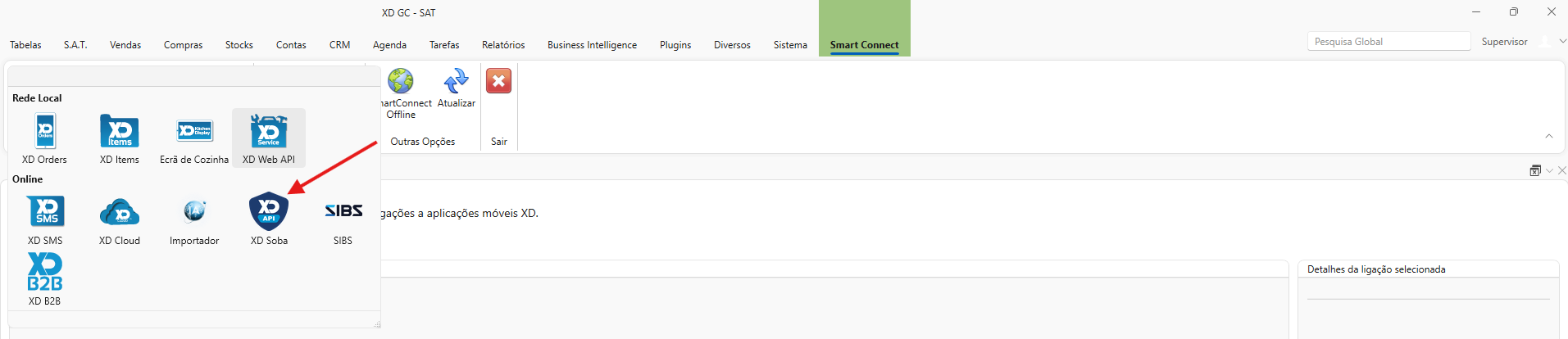
Step 3 – Account creation
The account creation form will open so you can configure XD Soba. Steps to create an XD Soba account: 1 - In the Tenant Key field, enter or confirm the company key provided by the administrator, for example: XDAO.5805. 2 - In the Password field, set the password that will be used to access XD Soba. 3 - In the Confirm Password field, enter the same password again. 4 - Confirm that both password fields contain exactly the same value. 5 - Click Create Account to complete the registration.
To close the form without creating the account, click Cancel or the X icon in the upper-right corner.
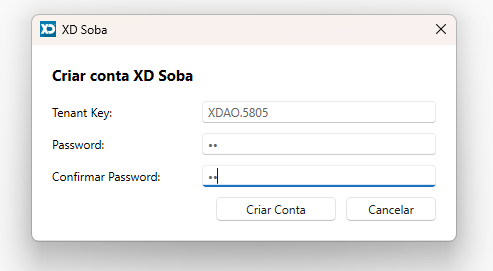
Step 4 – Confirm saving
After clicking Create Account, the following message will be shown:
“Do you want to save the changes?”
- Click Yes to confirm saving and finish creating the account.
- Click No to cancel saving and return to the form.

Step 5 – Confirm the Active Account
Go back to the Smart Connect tab and confirm that the XD Soba account appears as active.
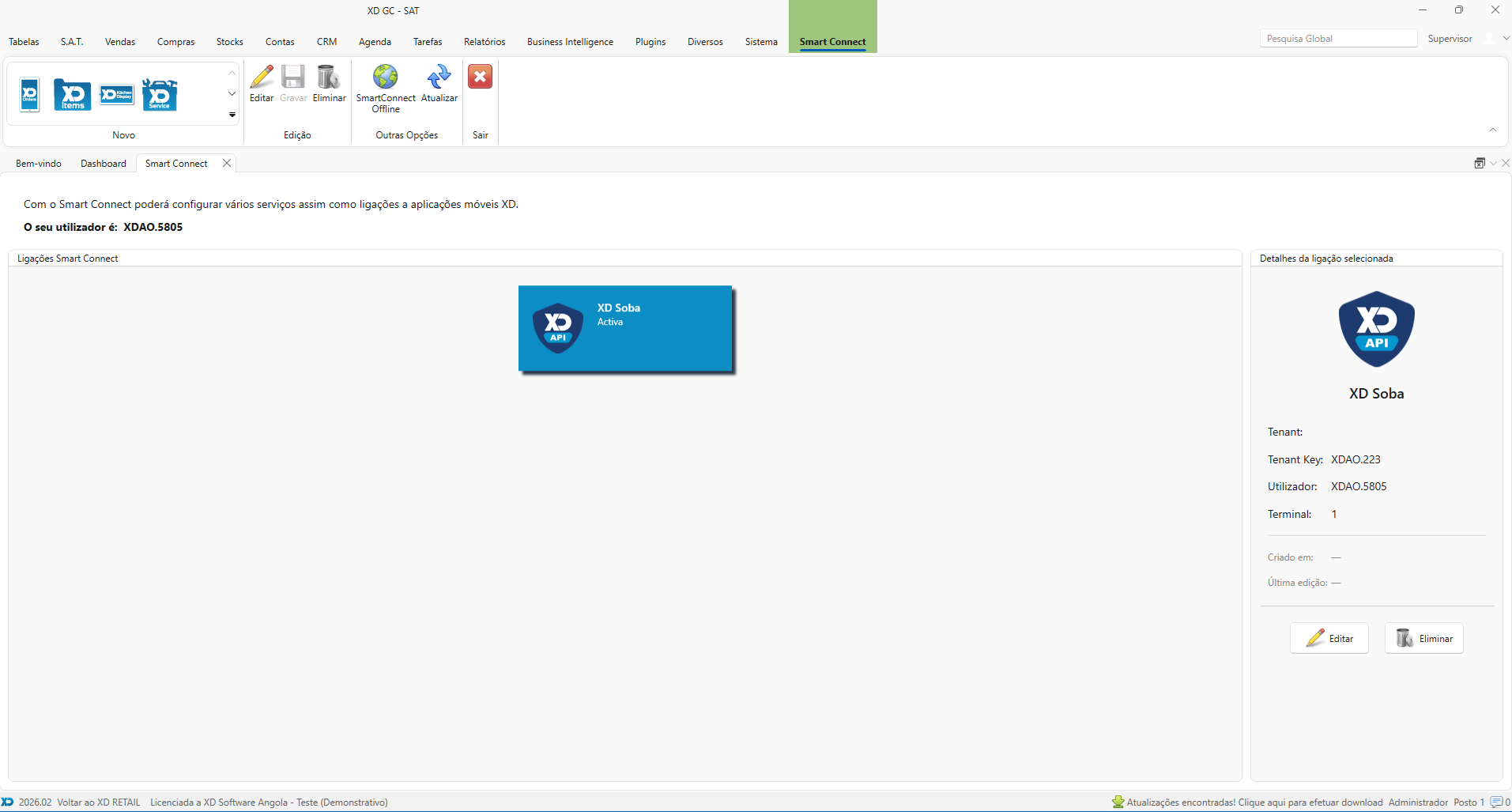
Configure the MySQL Connection in the XD Soba Frontend
Configure the MySQL database connection through the registration form in the XD Soba frontend.
Configuration flow:
- Open the authentication form in the XD Soba frontend at https://xdsoba.com/ and enter your access credentials.
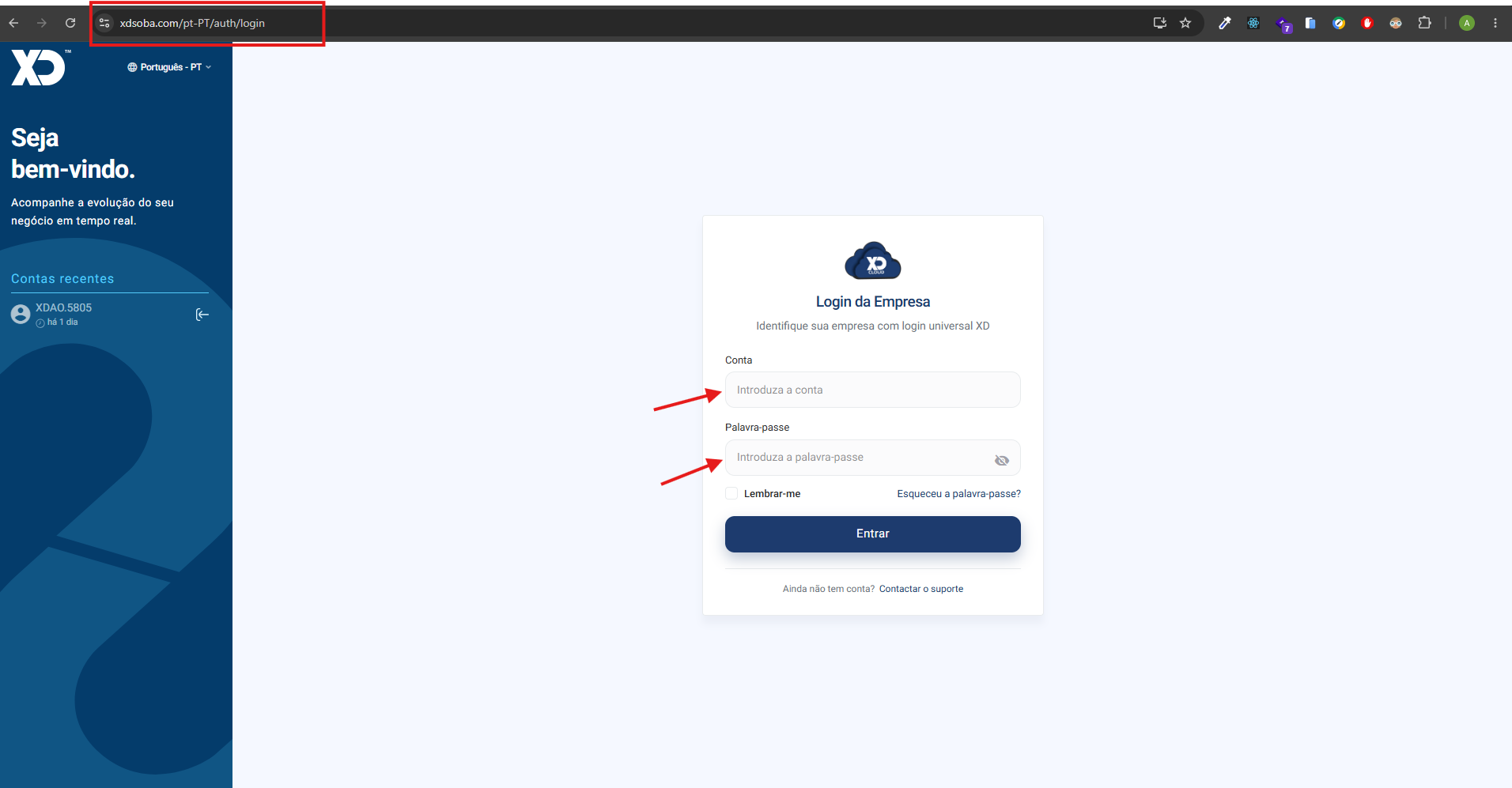
If you already have an account but the connection is not configured yet, the system will automatically redirect you to the connection registration form, as shown in the following image:
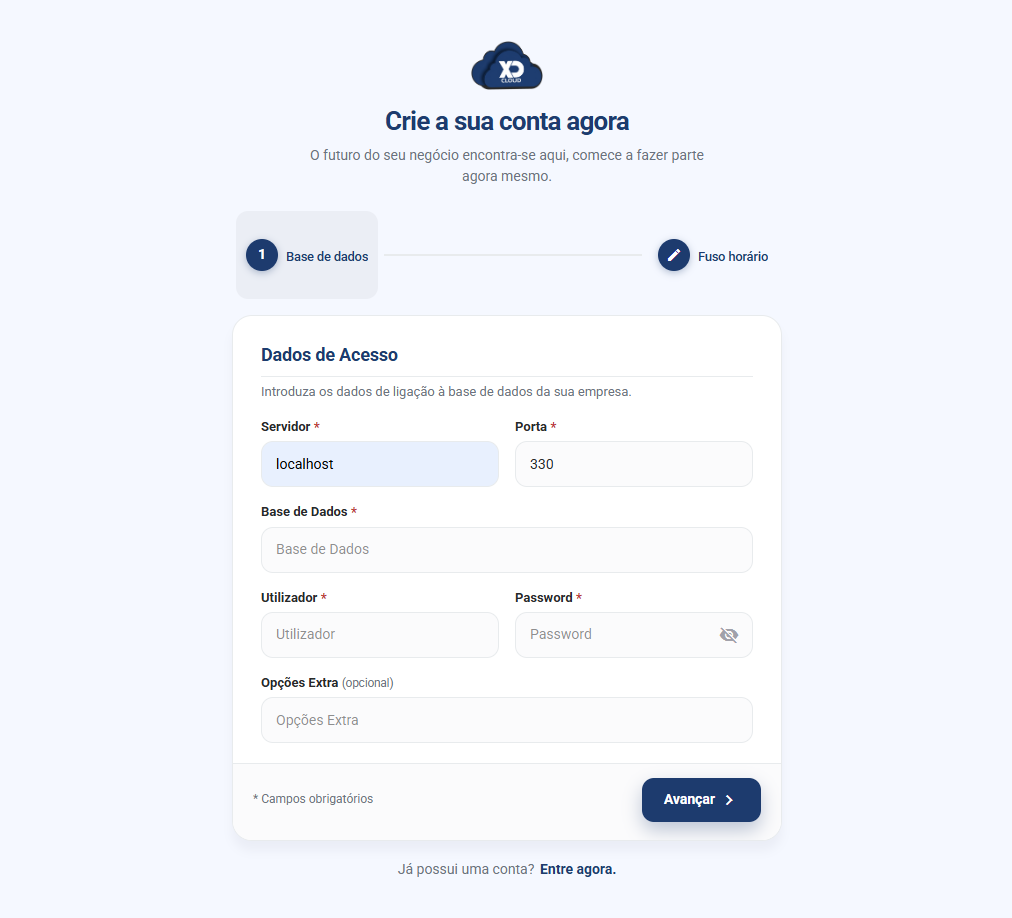
- Fill in the server connection details in the first registration step:
- Server: MySQL server address (e.g. cloudserverxd0003.ddns.net or the server IP)
- Port: MySQL port (usually 3306)
- Database: Name of the MySQL database specific to tenant XDAO.5805
- User: MySQL username with permissions to access the database
- Password: MySQL user password
- Extra Options: (optional) Additional connection options if needed
- Submit the form - The system will:
- Automatically save the connection string in Azure Key Vault with the key XDAO.5805
- Move on to the next step (time zone configuration)
- After you complete registration, the connection will be configured and the error will no longer occur
- Time Zone Configuration - Optional.
Time zone configuration is an optional step that can be done after configuring the connection, or at any later time through the Miscellaneous menu.
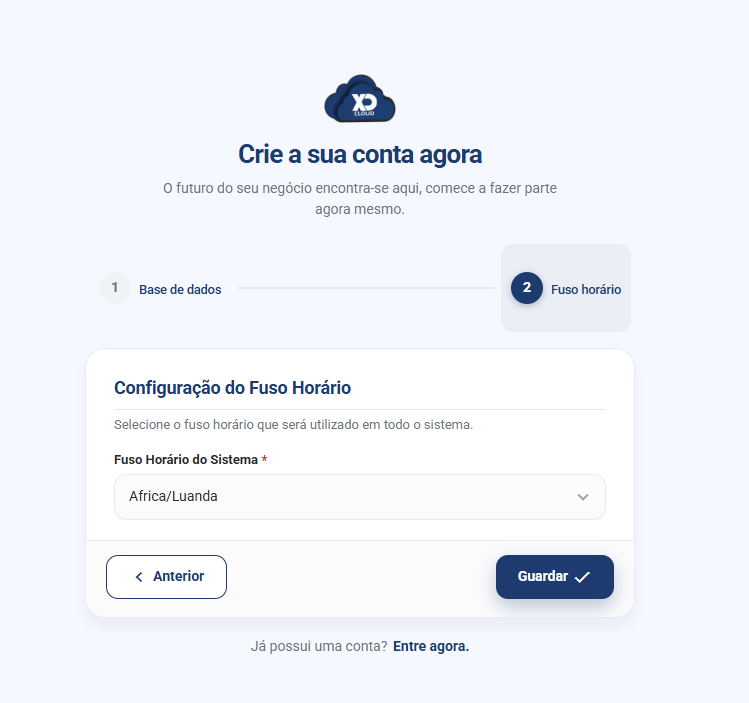
To set your time zone manually, follow these steps:
- Go to the Miscellaneous menu.
- Select the General option.
- In the top menu of the page, click Time Zone.
- Choose the desired time zone from the list and save the change.
To configure the database connection, you need the following at hand:
- MySQL Server: IP address or hostname of the MySQL server
- Port: MySQL access port (default: 3306)
- Database Name: Name of the MySQL database specific to the tenant
- MySQL User: Username with permissions to access the database
- MySQL Password: User password
Authentication and Obtaining the Token
After creating the XD Soba account, log in to obtain the authentication token that will be used to access the XD Soba endpoints.
Steps to log in:
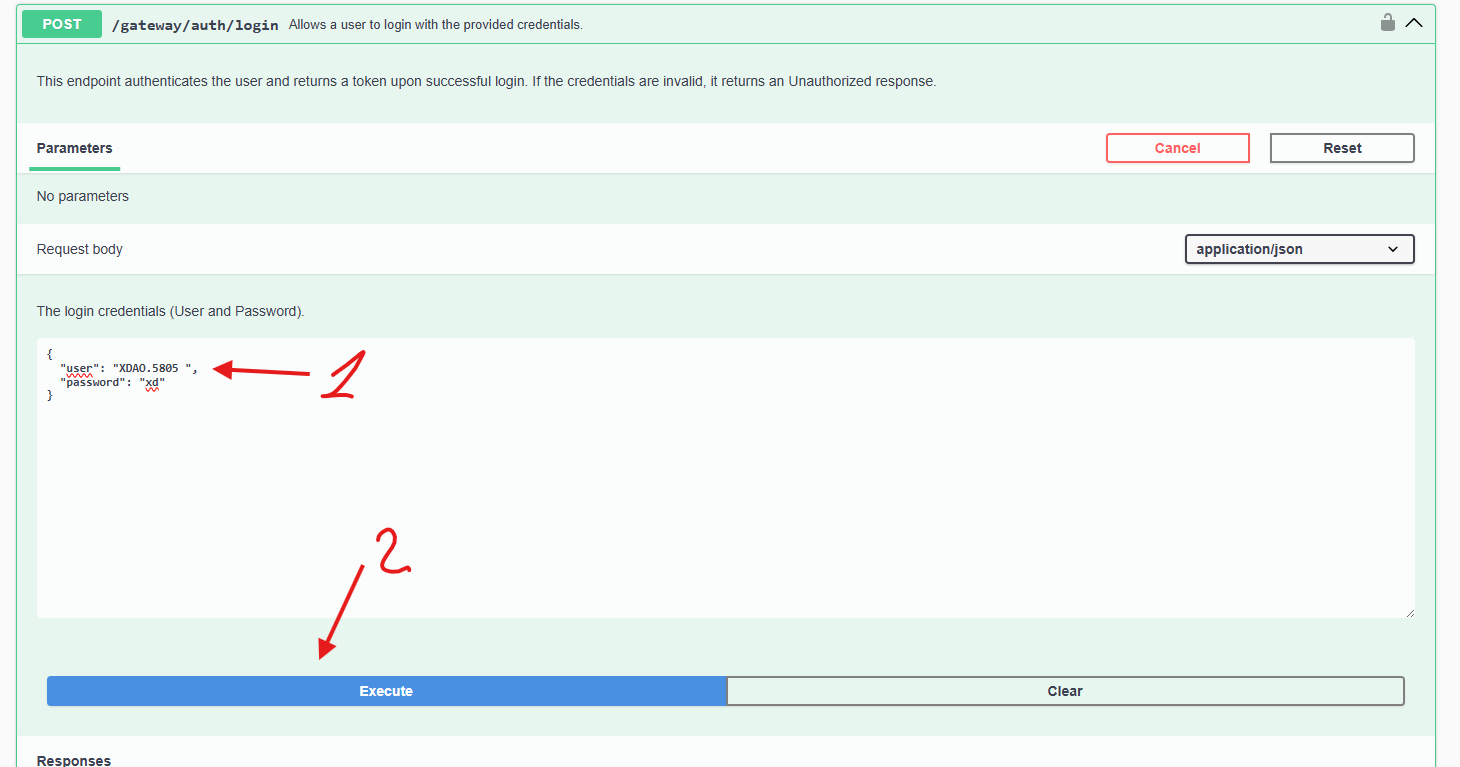
- Go to: https://api.xdsoba.com/swagger
- In the API menu, select the
/gateway/auth/loginendpoint. - Fill in the fields in the request body:
"user": Enter the license (XD Soba account)."password": Enter your password.
- Click Execute to submit the request.
After a successful login, you will receive a response containing the token.
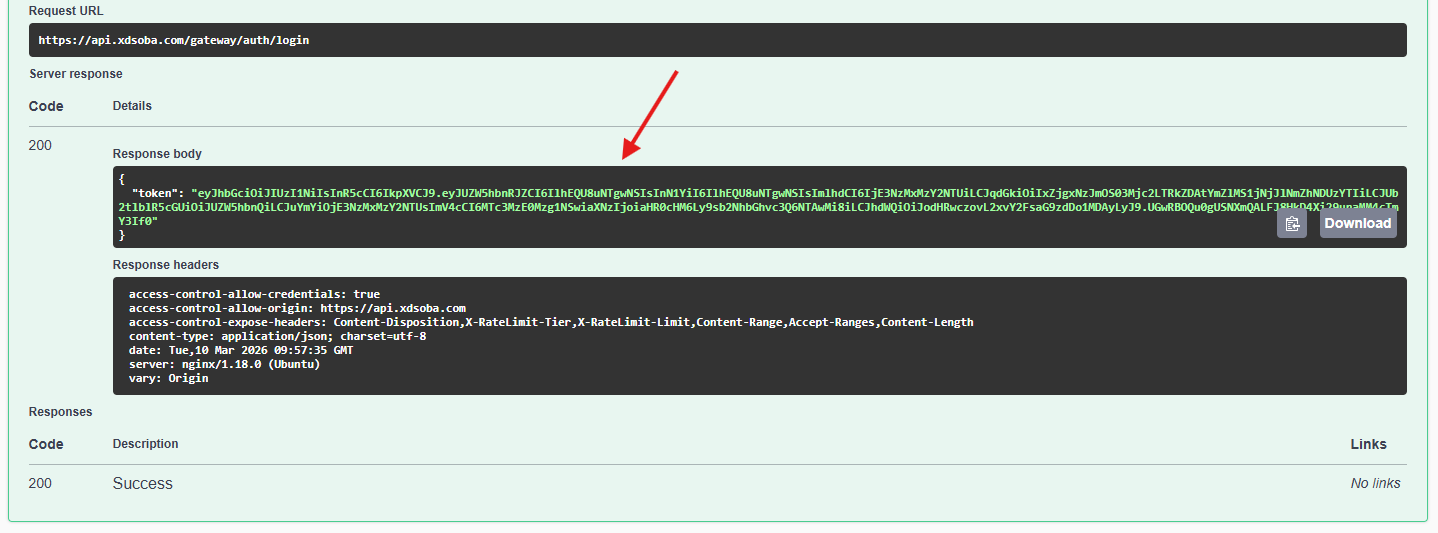
Always use your own license and password as configured in XD Gestão Comercial.
How to Use the Token
In every request to the API endpoints, include the token in the request header:
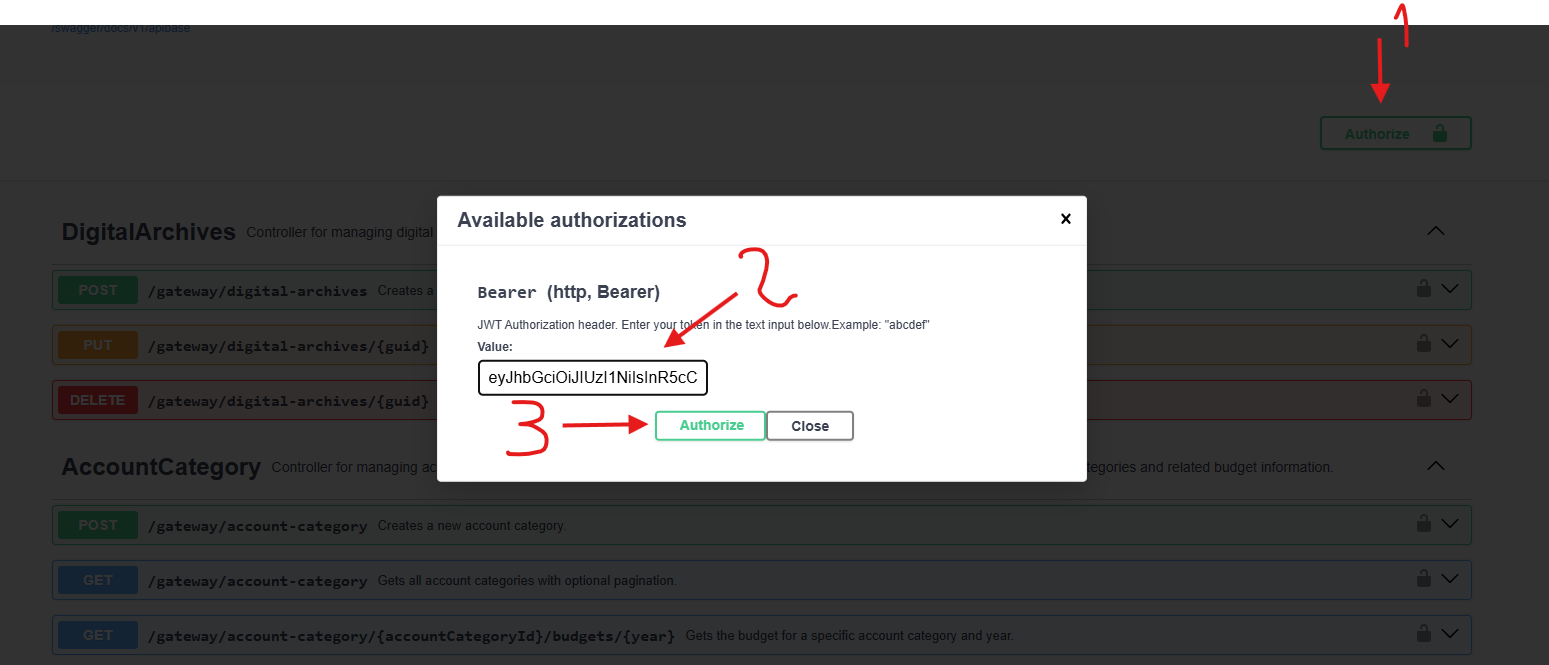
curl -X GET "https://api.xdsoba.com/gateway/item" \
     -H "Authorization: Bearer eyJhbGciOiJIUzI1NiIsInR5cCI6IkpXVCJ9.eyJzdWIiOiIxMjM0NTY3ODkwIiwibmFtZSI6IkpvaG4gRG9lIiwiYWRtaW4iOnRydWUsImlhdCI6MTUxNjIzOTAyMn0.KMUFsIDTnFmyG3nMiGM6H9FNFUROf3wh7SmqJp-QV30"
Endpoint Usage Examples
After completing all configuration steps (creating the XD Soba account, logging in, and configuring database access), you can use the XD Soba endpoints to access the available data and features.
Example 1: Querying Items
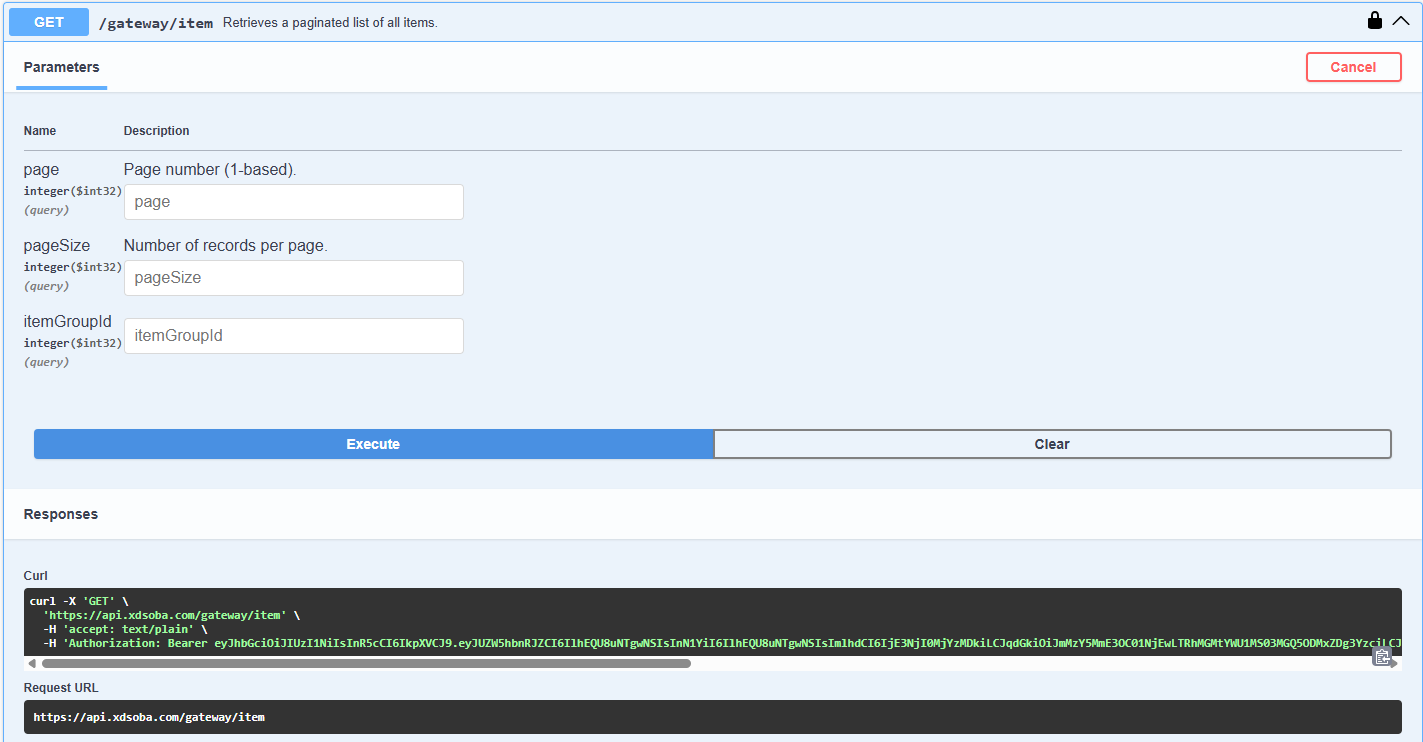
- In Swagger, select the
GET /gateway/itemendpoint. - Fill in the desired parameters (optional):
page: Number of records to skip (useful for pagination).pageSize: Number of records to return per page.itemGroupId: Filter by family/group.
- Click Execute to send the request.
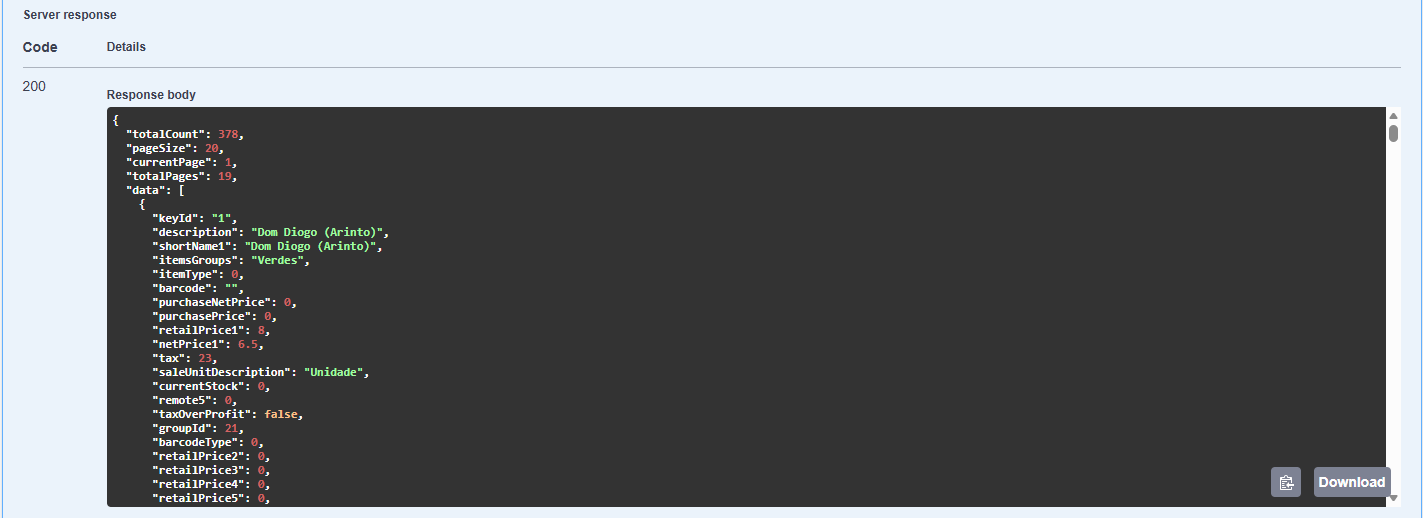
If everything is correct (and the authentication token has been set in the Authorization header), you will receive a response with the list of available items.
Security Notes
- Never share your access credentials.
- Do not store credentials in shared files.
- If in doubt, contact XD support.
Authentication
All API requests require authentication using JWT (JSON Web Tokens). To authenticate:
- Send a POST request to
/gateway/auth/loginwith your credentials - Use the returned token in the
Authorizationheader for subsequent requests
curl -X POST "https://api.xdsoba.com/gateway/auth/login" \
     -H "Content-Type: application/json" \
     -d '{"user": "your_user", "password": "your_password"}'
Include the token in your requests:
curl -X GET "https://api.xdsoba.com/gateway/item" \
     -H "Authorization: Bearer your_token_here"
Base URL
All API endpoints are relative to the base URL:
https://api.xdsoba.com/gateway
Common Headers
Include these headers in your requests:
Authorization: Bearer <token>- Required for authenticated endpointsContent-Type: application/json- Required for POST/PUT requestsAccept: application/json- Recommended for all requests
Rate Limiting
To ensure fair usage and system stability, we implement rate limiting:
- 100 requests per minute per API key
- Rate limit headers are included in responses:
X-RateLimit-Tier: Tier nameX-RateLimit-Limit-PerMinute: Maximum requests per windowX-RateLimit-Window: Time until the limit resets
Error Handling
The API uses standard HTTP status codes and returns error details in the response body:
{
  "status": 404,
  "title": "Not Found",
  "type": "https://tools.ietf.org/html/rfc7231#section-6.5.4",
  "errors": [
    {
      "code": "Item.NotFound",
      "description": "Item not found.",
      "type": 2,
      "furtherInformations": null
    }
  ]
}
Common status codes:
200 OK: Successful request201 Created: Resource created successfully400 Bad Request: Invalid request parameters401 Unauthorized: Invalid or missing authentication403 Forbidden: Insufficient permissions404 Not Found: Resource not found429 Too Many Requests: Rate limit exceeded500 Internal Server Error: Server-side error
Next Steps
Now that you understand the basics, you can:
- Explore the API Reference for detailed endpoint documentation
- Check the API Usage Guide for best practices and common patterns
- Visit the Troubleshooting Guide if you run into any issues